
Every post so far has been about Planck as a product:
- Context management, team specialization, and model routing,
- A basic harness,
- An opinionated stack you install with one
curl.
This one is about the part underneath all of it: planck_agent, the library every one of those
posts has been running on without naming it directly.
Say you don’t want a coding harness. You want an agent, with its own tools, inside an app you already have. Here’s what that actually takes.
What planck_agent Already Does
A planck_agent is a GenServer that drives a loop. Specifically, once you start one,
you already have:
- The agentic loop. Request a completion, notice tool calls in the response, run them, feed the results back for another turn.
- Concurrent tool calls. If one response calls more than one tool, they run at the same time, not one after another.
- Tool-call error handling. An exception inside a tool’s
execute_fnis caught automatically and turned into an error string the model sees. - Streaming, as events. Every step, a delta of thinking, a delta of text, a tool
starting, a tool finishing, a turn ending, is broadcast over Phoenix
PubSubas it happens. Subscribe once and you have a real-time feed. - Context compaction. Once a conversation grows past the model’s context window, a built-in LLM-based compactor summarizes older turns on its own.
- Usage and cost tracking. Token counts and cost per turn are tracked in the agent’s own state and included in every event.
- Conversation history. Every message lives in the agent’s own state for as long as the
process is alive. If the agent has a
session_id, the session will be persisted in a SQLite-backed store.
You provide tools, a system prompt, and a model. For more customization you can
implement any of the supported hooks, each just another start_link option, a module
you pass in, nil by default:
compactor:replaces the built-in LLM-based compaction strategy with your ownprompt_hook:injects dynamic content into the system prompt before every turnturn_end_hook:reacts to a completed turn in the background, e.g. to write a skilltool_start_hook:gates every tool call before it runs (allow / deny / park for approval)tool_end_hook:transforms a tool result (text or UI) after executionturn_start_hook:observes a turn beginning (async, cannot block)persistence:replaces the built-in SQLite-backed store with your own
Travel Agent Demo
Yeah, pun intended!
What we’re building:
- A single script with a Phoenix LiveView app,
- Lets you set the model config, then your budget, desired date range, and number of travelers.
After all that, a travel agent that interviews a visitor, checks real weather and country data for a couple of candidate destinations, searches flights, and books one.
One agent, four tools: interview, check weather and country facts, search flights, reserve one.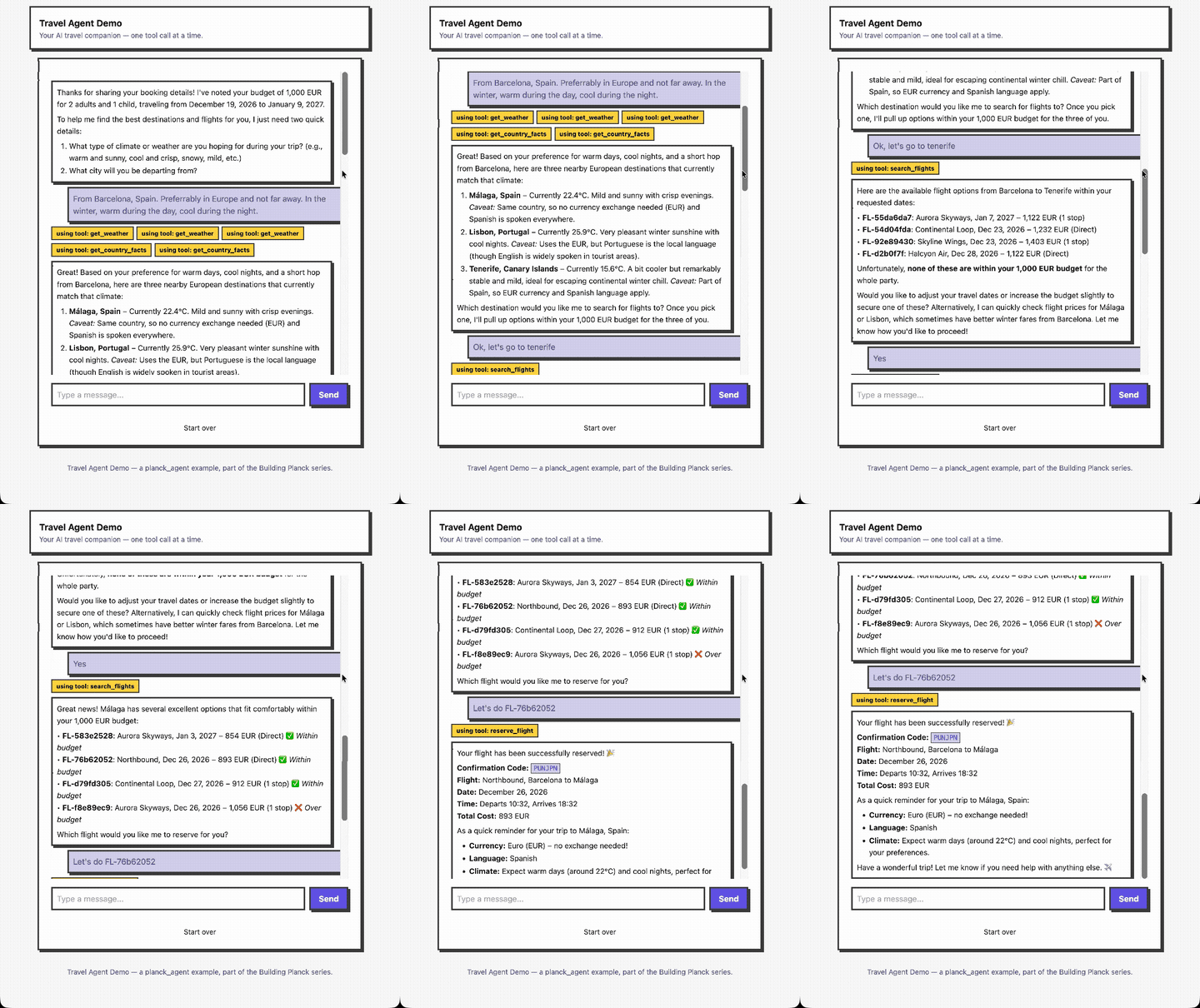
Four Tools
An agent doesn’t have any tools unless we define them. The four tools implemented in this demo are:
get_weather: current conditions for a city, via Open-Meteo, a free, keyless API.get_country_facts: currency, languages, and region for a country, via REST Countries, also free and keyless.search_flights: simulated. No free flight-pricing API exists, so results are deterministically generated from the route, dates, and budget. The same inputs always return the same flights, so a flight ID the model quotes in one turn still resolves if it searches again later.reserve_flight: reserves one of the flightssearch_flightsreturned, byflight_id.
And this is what the tool get_weather looks like:
alias Planck.Agent.Tool

Tool.new(
  name: "get_weather",
  description:
    "Get current weather conditions for a city, to check whether it matches the " <>
      "traveler's desired climate right now.",
  parameters: %{
    "type" => "object",
    "properties" => %{
      "location" => %{"type" => "string", "description" => "City name, e.g. \"Lisbon\""}
    },
    "required" => ["location"]
  },
  execute_fn: fn _agent_id, _id, %{"location" => location} ->
    with {:ok, geo} <- TravelAgent.OpenMeteo.geocode(location),
         {:ok, summary} <- TravelAgent.OpenMeteo.forecast(geo.lat, geo.lon) do
      {:ok, "#{geo.name}, #{geo.country}: #{summary}"}
    end
  end
)
Building the Model Yourself
A model is a plain struct. Build it from whatever configuration your own app already has:
alias Planck.AI.Model

case params["provider"] do
  p when p in ["anthropic", "openai", "google"] ->
    set_api_key_env(p, params["api_key"])

    {:ok,
     %Model{
       id: params["model"],
       model: params["model"],
       name: params["model"],
       provider: String.to_existing_atom(p),
       context_window: 128_000,
       max_tokens: 8_192
     }}
end

defp set_api_key_env("anthropic", key), do: System.put_env("ANTHROPIC_API_KEY", key)
defp set_api_key_env("openai", key), do: System.put_env("OPENAI_API_KEY", key)
defp set_api_key_env("google", key), do: System.put_env("GOOGLE_API_KEY", key)
The provider layer reads API keys straight from the OS environment on every request, with no caching and no reload step. Set it once, and every call after that picks it up.
Starting the Agent
This is the whole integration:
defp start_agent(socket) do
  Agent.subscribe(socket.id)

  DynamicSupervisor.start_child(
    Agent.AgentSupervisor,
    {Agent,
     id: socket.id,
     model: socket.assigns.model,
     system_prompt: TravelAgent.SystemPrompt.text(),
     tools: TravelAgent.Tools.build(socket.id)}
  )
end
As the calling process is subscribed to the agent updates via the
Agent.subscribe/1, we just need to receive the message. In our demo,
it’s a Phoenix LiveView, so we need to listen for message in the handle_info/3
callback implementation.
(...)

def handle_info({:agent_event, :text_delta, %{text: text}}, socket) do
  # append to the message currently streaming in
end

def handle_info({:agent_event, :tool_start, %{name: name}}, socket) do
  # show "using tool: get_weather"
end

def handle_info({:agent_event, :turn_end, payload}, socket) do
  # the turn is done; payload.message is the final assistant message
end

(...)
Finally, we can send user prompts with Agent.prompt(pid, text) from our LiveView:
(...)

def handle_event("send", %{"text" => text}, socket) when text != "" do
  Agent.prompt(socket.assigns.agent_pid, text)

  {:noreply,
    socket
    |> assign(:messages, socket.assigns.messages ++ [%{role: :user, text: text}])
    |> assign(generating: true, input_key: socket.assigns.input_key + 1)}
end

(...)
Try It
The full example, all four tools, the deterministic flight simulator, and a small Phoenix
LiveView front end, lives in
planck_agent/examples/travel-agent
as a single file. Mix.install/2 handles every dependency, LiveView’s JS comes from a CDN,
and there’s no asset pipeline to run:
elixir travel_agent.exs
Then open localhost:8000, pick a provider, and describe a trip.
Conclusion
Streaming, concurrent tool calls, context that doesn’t blow the model’s window, errors that don’t crash the conversation: everything that makes an agent hard to get right already exists. You’re not writing an agent. You’re deciding what one is allowed to do, and giving it a voice.
Most of what looks like “building an agent” is just deciding what it’s allowed to do.