
The first three posts in this series each identified a constraint:
- Context is quadratically expensive. Keep it small.
- One agent cannot focus on everything. Build a team.
- Most steps don’t need the most advanced model. Route accordingly.
Those three constraints shaped Planck. The framework doesn’t enforce them, but its structure nudges you toward all three.
The Harness
If the model is the brains and context is the memory, the harness is the body. It gives the model a way to act: read files, call APIs, run commands, delegate to other agents.
The harness assembles context, feeds it to the model, and executes what the model returns.
flowchart LR
    subgraph Agent["Agent = model + context + harness"]
        M["Model\n(reasons)"]
        C["Context\n(sees)"]
        H["Harness\n(acts)"]
        H -->|"assembles"| C
        C --> M
        M -->|"tool calls"| H
    end
    W["World\n(files · APIs · shell)"]
    H -->|"executes"| W
    W -->|"results"| H
The Name
Planck is named after the Planck length, the smallest meaningful distance in physics. The philosophy transfers: agents should be as small as meaningful. One job, one system prompt, one focused tool list. A team of specialized agents.
The Language
Agents are concurrent processes that send messages to each other, fail independently, and need supervision. That is exactly what the BEAM was designed for. The EVM handles tens of thousands of lightweight processes natively, with built-in message passing, fault isolation, and supervision trees.
With all those features covered in the runtime, I only needed to implement the agent logic.
An AI agent team is a supervision tree. Each agent is a process.
The Foundations
Planck is organized as three libraries that can be used independently or composed together.
The monorepo also ships planck_cli,
a complete web agent harness built on the three libraries.
Each library has a single responsibility. Sidecar tools extend the pool without touching the core.
flowchart TB
    CLI["planck_cli\n(App: Web UI + HTTP API)"]
    HL["planck_headless\n(Lib: Sessions · Config · Teams · Sidecar)"]
    AG["planck_agent\n(Lib: Agent processes · PubSub · Tools)"]
    AI["planck_ai\n(Lib: LLM abstraction · Streaming · Models)"]
    SC["Sidecar\n(App: Custom tools)"]

    CLI --> HL
    HL --> AG
    AG --> AI
    HL -. connects .-> SC
planck_aiis the LLM abstraction layer. Built on top ofreq_llm, it provides typed structs, a streaming event protocol, and a provider-agnostic API that speaks to Anthropic, Google, any OpenAI-compatible endpoint, and Typesafe (whose RLCD models answer typed questions with calibrated probabilities instead of chatting).planck_agentis the agent core. Each agent is aGenServerthat manages its own conversation history, handles tool calls, and publishes events over PhoenixPubSub.planck_headlessis the application layer. It owns configuration (from JSON files, environment variables, or application config), loads resources at startup (teams, skills, models, custom slash commands), manages session lifecycles (including the/clearand/compactcommands), and handles the optional sidecar connection.
planck_headless also supports the sidecar: an optional app that adds custom tools without
touching the core libraries (more on that later).
The Principles
In a Planck team definition, we can see the three principles in action. A team lives in a
directory under .planck/teams/. The TEAM.json file declares its members:
{
  "name": "dev-team",
  "description": "A planner, builder, and reviewer for software tasks.",
  "members": [
    {
      "type":          "orchestrator",
      "provider":      "anthropic",
      "model_id":      "claude-sonnet-4-6",
      "system_prompt": "members/orchestrator.md",
      "tools":         ["read", "list_team", "call_agent", "interrupt_agent"]
    },
    {
      "type":          "planner",
      "provider":      "anthropic",
      "model_id":      "claude-opus-4-8",
      "system_prompt": "members/planner.md",
      "tools":         ["read", "write", "edit", "respond_agent"]
    },
    {
      "type":          "builder",
      "provider":      "local_gemma",
      "model_id":      "gemma-4-12b",
      "system_prompt": "members/builder.md",
      "tools":         ["read", "write", "edit", "bash", "respond_agent"],
      "skills":        ["elixir-dev"]
    },
    {
      "type":          "reviewer",
      "provider":      "local_qwen",
      "model_id":      "qwen3.6-27b",
      "system_prompt": "members/reviewer.md",
      "tools":         ["read", "send_agent", "respond_agent"]
    }
  ]
}
Each agent has:
- Their own system prompt, tools and skills: keep context small,
- Their own clear role within the workflow: build a specialized team,
- Their own model, matched to how much reasoning the step actually needs: route accordingly.
We can’t prompt our way around a missing tool. And we can’t accidentally grant one.
The Tools
Planck has several built-in tools, organized in five categories: files, delegate, orchestrate, skills, and ask.
Read, Write, Edit, Run
They are the basic tools an agent needs to interact with its environment:
read: reads files with offset and limit supportwrite: creates or overwrites filesedit: replaces exact strings; the surgical alternative to rewritingbash: runs shell commands, with process group cleanup on timeout
Delegate
Delegate tools are how agents hand work to each other. Every agent gets them, not just the orchestrator:
call_agent: sends a synchronous message from a delegator agent to a target agent and blocks until the target’s turn naturally ends. No explicit reply needed on the target’s part.send_agent: sends an asynchronous message from a delegator agent to a target agent. The target also callsrespond_agentwhen done. This will trigger a new turn in the delegator agent if it ended its previous turn.respond_agent: the target agent responds to the delegator agent.list_team: returns all agents in the team with their type, name, description, and status. Passverbose: trueto also get tool names and model per member, useful when reasoning about which worker to delegate a task to. Theidit returns is whatcall_agent/send_agenttarget.
Both call_agent and send_agent accept an optional reset_previous_context: true
parameter that archives the target’s prior history before sending, giving the worker
a clean slate for a new task.
Orchestrate
Orchestrate tools only go to the orchestrator. They’re how the team grows, shrinks, and redirects at runtime, with no restart required:
spawn_agent: creates a new worker at runtime with a given model, role, system prompt, and tool list. The team can grow dynamically without restarting.destroy_agent: terminates an agent permanently and removes it from the team.interrupt_agent: aborts an agent’s current turn without terminating it. The agent stays alive and returns to idle.list_models: returns all configured and connected models available for spawning agents, including provider, context window, and base URL.
Skill Up
A skill is a reusable markdown file an agent can load on demand: a rubric, a style guide,
a set of procedures. When skills are configured, two tools are injected automatically
without any TEAM.json declaration:
load_skill: loads a skill’s full instructions by name. Every agent gets this automatically.list_skills: lists all available skills in the pool. Orchestrators get this automatically; workers opt in by declaring it in their"tools"array.
Each agent has their own rank of skills injected on their system prompt. The more they load a skill, the more relevant these skill gets for said agent. This allows agents to adapt to their current job over time.
Ask
Not every decision needs a chat model burning tokens parsing free text. ask
asks a Typesafe/RLCD model (Typesafe’s own System One
models, or a wire-compatible self-hosted server like
decider) a set of typed questions about
some state and gets calibrated probabilities back instead of prose:
ask: takes aprovider/model_idpointing at an RLCD model, astateto evaluate, and namedquestions(Choice, Score, or Boolean). It never starts an agent. It’s a single stateless call, so it can’t chat, stream, or use tools.ask_files: the same questions applied to many files or glob patterns at once. A call toask_filesgets all the files related with the LLM’s query in seconds without ever reading them. This initial triage is specially useful when investigating vague tasks e.g. a bug reports.
An 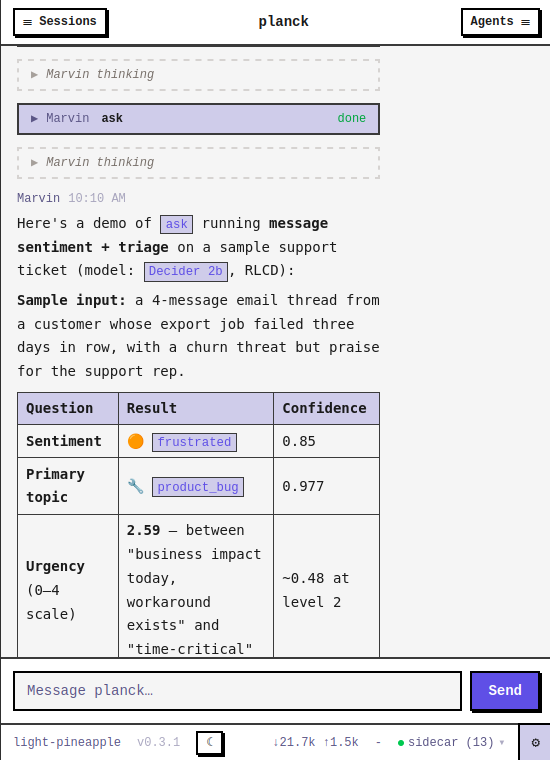
ask call: typed questions in, calibrated probabilities out.
Note:
askandask_filesaren’t declared inTEAM.jsonlike a normal tool. They’re granted to the orchestrator automatically whenever at least onetypesafe-provider model is configured, and they’re absent entirely otherwise.
The Events
Planck’s communication model has two layers.
Between agents, all communication is message passing via the delegate tools.
Between Planck and the outside world, communication is events. Every agent publishes to a PubSub topic. Any process that subscribes gets a real-time stream:
{:ok, session_id} = Planck.Headless.start_session(template: "dev-team")

Phoenix.PubSub.subscribe(Planck.Agent.PubSub, "session:#{session_id}")

Planck.Headless.prompt(session_id, "Refactor lib/auth.ex into a separate module")

receive do
  {:agent_event, :text_delta, %{text: chunk}} -> IO.write(chunk)
  {:agent_event, :turn_end, _}                -> :done
end
The subscriber never reaches into agent internals. It sends a prompt and listens for
events: :text_delta, :thinking_delta, :turn_start, :turn_end, :tool_start,
:tool_end, :tool_blocked, :usage_delta, :worker_spawned, :worker_exit, :error,
:compacting, :compacted, plus the queue lifecycle (:message_queued,
:messages_flushed, :message_cancelled) and :cleared when history is wiped.
The Sidecar
The built-in tools cover the basics. Custom tools live in a sidecar: a separate Elixir/OTP application that connects over distributed Erlang. Database queries, API calls, specialized analyzers: anything the core doesn’t ship with.
Two BEAM nodes over distributed Erlang: tools are discovered once at startup, then called like any other tool at runtime.
flowchart LR
    subgraph Core["planck node"]
        AG["planck_agent"]
    end
    subgraph Side["sidecar node"]
        T["tools"]
    end
    AG -->|"1: connect + list_tools/0"| Side
    AG <-->|"2: tool call / result"| Side
The sidecar implements one callback:
defmodule MySidecar.Planck do
  use Planck.Agent.Sidecar

  @impl true
  def tools do
    [
      Planck.Agent.Tool.new(
        name: "run_tests",
        description: "Run the test suite and return output.",
        parameters: %{
          "type" => "object",
          "properties" => %{
            "timeout_ms" => %{
              "type"        => "integer",
              "description" => "Max milliseconds to wait (default 300000)"
            }
          }
        },
        execute_fn: fn _agent_id, _id, args ->
          timeout = Map.get(args, "timeout_ms", 300_000)
          case System.cmd("mix", ["test"], timeout: timeout) do
            {output, 0} -> {:ok, output}
            {output, _} -> {:error, output}
          end
        end
      )
    ]
  end
end
When Planck starts, it connects to the sidecar node and calls list_tools/0. The returned
tools are loaded into the resource pool and available to any agent that declares them. The
sidecar can be as minimal as a single module or as rich as a full Phoenix application with
its own database connection, supervision tree, and tests.
Widgets
A tool’s result isn’t limited to what the model reads, either. It can attach a UI side effect (invisible to the model’s own context, so it costs no tokens), pairing the tool with a widget: real, sidecar-rendered UI that streams into the chat.
defmodule MySidecar.Widgets.Counter do
  use Planck.Agent.Widget

  def id, do: "counter"
  def render(_myself), do: "<div>count: #{count()}</div>"
  def handle_action("increment", _args), do: increment()
end
Planck.Agent.Tool.new(
  name: "show_counter",
  description: "Show a live counter widget.",
  parameters: %{"type" => "object", "properties" => %{}},
  widget: MySidecar.Widgets.Counter,
  execute_fn: fn _agent_id, _id, _args ->
    {:ok, "Counter shown.",
     %{ui: %{kind: :widget, label: "Open counter", widget: "counter", data: nil}}}
  end
)
The model only sees “Counter shown.” Whoever’s watching the chat also sees a button that opens the widget itself. It’s HTML the sidecar builds, not a fixed catalog Planck ships with.
The beads board widget opening in the chat. More on beads and the rest of the opinionated sidecar stack in the next post.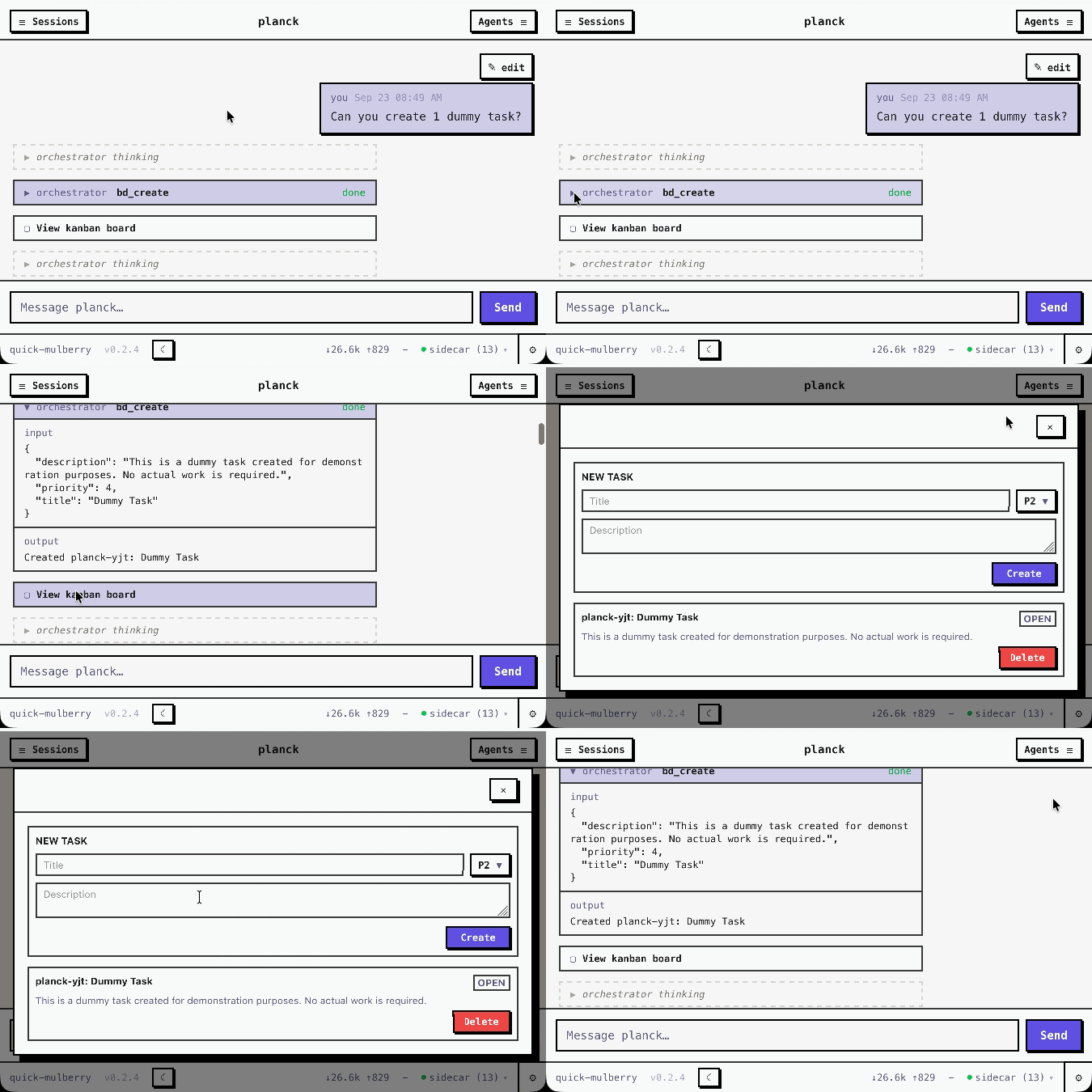
Hooks
The sidecar also provides hooks: lifecycle callbacks implemented in the sidecar.
prompt_hook: declared per-agent; runs before each LLM turnturn_end_hook: declared per-agent; runs after each LLM turntool_start_hook: declared per-agent; gates every tool call before it runs: allow, deny, or park it for human approvaltool_end_hook: declared per-agent; transforms a tool result (text or UI) after executionturn_start_hook: declared per-agent; observes a turn beginning (async, cannot block)compactor: runs for all agents automatically; can be overridden per-agent inTEAM.jsonpersistence: runs for all agents automatically; can be overridden per-agent inTEAM.jsonto swap the built-in SQLite-backed conversation store for your own
UI Extension
Tools extend what an agent can do. Widgets extend what it can show. Hooks extend how it behaves.
The core library does not change regardless.
The sidecar is the extension point. The harness is the stable surface.
The CLI Web UI
I considered a TUI when starting the CLI harness. A terminal interface felt natural for a coding agent. But I didn’t want just a coding agent. I wanted a team of agents for different tasks.
I wanted to have a better way to access it. A web UI allows me to host it on a server and reach it from any device with a browser. I no longer need to be in my shell. I can be on my phone, on my tablet, on a random toaster screen.
A Phoenix LiveView application handles Markdown rendering, syntax-highlighted code blocks, streaming text, and a real-time sidebar showing each agent’s token usage and cost.
The same Phoenix app also serves an HTTP/SSE API at /api. Any process that can make an
HTTP request or consume a Server-Sent Events stream gets full access to the session.
GET  /api/sessions              # list all sessions
POST /api/sessions              # start a session
POST /api/sessions/:id/prompt   # send a prompt
GET  /api/sessions/:id/events   # SSE event stream
(...)
This API allows users to control Planck with other agent harnesses e.g., Claude Code could control a full Planck team remotely.
The Configuration
Planck reads configuration from .planck/config.json. A minimal setup declares a
provider and at least one model alias:
{
  "default_model": "sonnet",
  "providers": {
    "anthropic": { "type": "anthropic" }
  },
  "models": [
    { "id": "sonnet", "model": "claude-sonnet-4-6", "provider": "anthropic" }
  ]
}
API keys go in .planck/.env (project-local) or ~/.planck/.env (global):
ANTHROPIC_API_KEY=sk-ant-...
Teams live under .planck/teams/, skills under .planck/skills/, custom slash
commands under .planck/commands/, and the sidecar under .planck/sidecar/.
Planck loads them all at startup.
The planck_setup
skill is available as a standalone download and is included in the Docker bundle (more
on that in the next post). Install it under
.planck/skills/ and any agent in any session can load it for the full configuration
reference: providers, models, teams, sidecars, hooks, widget, and the HTTP API.
The Design Decisions
Two choices that aren’t obvious from the feature list but change how you work with Planck.
You can see what each agent sees
Every agent has an agent details view in the web UI: its assembled system prompt, the tools it actually has, the hooks wired to it, its skills, and (for the orchestrator) its slash commands. When a multi-agent team misbehaves, the first question is always “what is this agent actually looking at?” That answer is one click away instead of something you reconstruct from logs.
The agent details modal: the assembled prompt, the actual tools, hooks, and skills, one click away.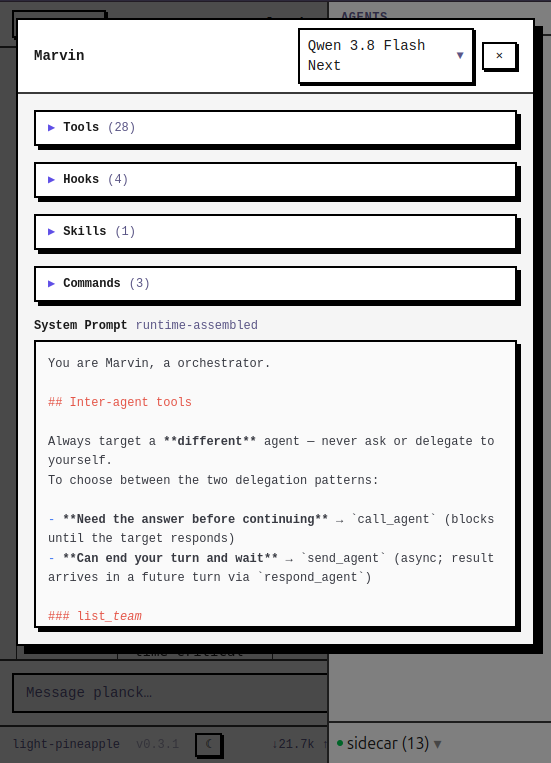
Sessions are disposable, and named that way
A session’s name is a random adjective-fruit pair (brave-apple,
quiet-mango) or whatever you type. It is never derived from the
conversation’s contents. That’s deliberate. A name that summarizes the content
implies the session is an artifact worth keeping by title.
Planck assumes the opposite: sessions are cheap, short-lived containers, not long-lived projects. Start one, do the thing, let it go. Anything worth keeping shouldn’t survive by being in a session. It should be promoted to a skill, a memory, or a file. (How the opinionated stack makes “the context from a past session is a search away” a non-issue is covered in the next post.)
The Conclusion
The previous three posts described three independent constraints. Planck is where they connect: small agents with focused context, organized into specialized teams, routing each step to the right model.
planck_ai, planck_agent,
and planck_headless are each published to Hex as
standalone libraries. You can use them independently to build your own harness, or start
from Planck’s agent harness and extend it via the sidecar.
In the next post, we package Planck into a self-contained Docker bundle and ship a sidecar with it: credential safety, private search, workspace and web efficiency, document extraction, long- and short-term memory, self-improving skills, and shared task coordination.
As small as meaningful. As focused as necessary. As local as possible.